Annotations
Annotations allow you to attach contextual information to accounts, assets, or sensors over specific time periods. They help document important events, holidays, alerts, maintenance windows, or any other information that adds context to your time series data.
What are annotations?
An annotation is a piece of metadata associated with a specific entity (account, asset, or sensor) during a defined time period. Each annotation includes:
Content: Descriptive text (up to 1024 characters)
Time range: Start and end times defining when the annotation applies
Type: Category of the annotation (label, holiday, alert, warning, error, or feedback)
Prior: Timestamp when the annotation was recorded
Source: The data source that created the annotation (typically a user or automated system)
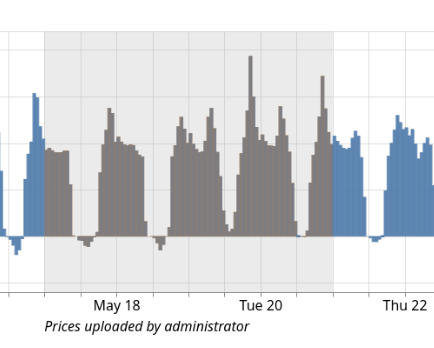
An annotation displayed on the sensor page
Use cases
Annotations are particularly useful for:
- Forecasting and Scheduling
Holiday annotations help forecasting algorithms understand when energy consumption patterns deviate from normal patterns. FlexMeasures can automatically import public holidays using the
flexmeasures add holidayscommand.- Data Quality Tracking
Mark periods with known sensor issues, data gaps, or quality problems using
errororwarningtype annotations. This helps analysts understand why certain data points might be unreliable.- Operational Documentation
Document maintenance windows, system changes, or configuration updates with
labeltype annotations. Record feedback about system behavior for future reference.- Alert Management
Create
alerttype annotations for active issues requiring attention. When resolved, the status changes and the annotation becomes part of the operational history.- Asset Context
Mark special events at the asset level (e.g., building renovations, equipment upgrades). These annotations appear in all related sensor charts for that asset.
Annotation types
FlexMeasures supports six annotation types:
labelGeneral-purpose annotations for documentation and notes. Default type if not specified.
holidayPublic or organizational holidays that may affect energy patterns. Used by forecasting algorithms.
alertActive warnings requiring attention or action.
warningInformational warnings about potential issues or degraded conditions.
errorMarkers for periods with data quality issues, sensor failures, or system errors.
feedbackUser feedback or observations about system behavior or data.
Creating annotations via API
The annotation API provides three POST endpoints:
POST /api/v3_0/accounts/<id>/annotations- Annotate an accountPOST /api/v3_0/assets/<id>/annotations- Annotate an assetPOST /api/v3_0/sensors/<id>/annotations- Annotate a sensor
Authentication
All annotation endpoints require authentication. Include your access token in the request header:
{
    "Authorization": "<your-access-token>"
}
See Authentication for details on obtaining an access token.
Permissions
You need create-children permission on the target entity (account, asset, or sensor) to create annotations.
The permission system ensures users can only annotate resources they have access to.
See Authorization for more details on FlexMeasures authorization.
Request Format
All annotation endpoints accept the same request body format:
{
    "content": "Sensor maintenance performed",
    "start": "2024-12-15T09:00:00+01:00",
    "end": "2024-12-15T11:00:00+01:00",
    "type": "label",
    "prior": "2024-12-15T08:45:00+01:00"
}
Required fields:
content(string): Description of the annotation. Maximum 1024 characters.start(ISO 8601 datetime): When the annotated period begins. Must include timezone.end(ISO 8601 datetime): When the annotated period ends. Must be afterstart. Must include timezone.
Optional fields:
type(string): One of"alert","holiday","label","feedback","warning","error". Defaults to"label".prior(ISO 8601 datetime): When the annotation was recorded. Defaults to current time if omitted.
Response Format
Successful requests return the created annotation:
{
    "id": 123,
    "content": "Sensor maintenance performed",
    "start": "2024-12-15T09:00:00+01:00",
    "end": "2024-12-15T11:00:00+01:00",
    "type": "label",
    "prior": "2024-12-15T08:45:00+01:00",
    "source": 42
}
The source identifies the data source that created the annotation (typically corresponds to the authenticated user).
Status Codes
201 Created: A new annotation was created200 OK: An identical annotation already exists (idempotent behavior)400 Bad Request: Invalid request data (e.g., end before start, missing required fields)401 Unauthorized: Missing or invalid authentication token403 Forbidden: User lacks permission to annotate this entity404 Not Found: The specified account, asset, or sensor does not exist422 Unprocessable Entity: Request data fails validation500 Internal Server Error: Server error during annotation creation
Examples
Example 1: Mark a holiday on an asset
curl -X POST "https://company.flexmeasures.io/api/v3_0/assets/5/annotations" \
  -H "Authorization: YOUR_TOKEN_HERE" \
  -H "Content-Type: application/json" \
  -d '{
    "content": "Christmas Day - reduced operations",
    "start": "2024-12-25T00:00:00+01:00",
    "end": "2024-12-26T00:00:00+01:00",
    "type": "holiday"
  }'
Response:
{
    "id": 456,
    "content": "Christmas Day - reduced operations",
    "start": "2024-12-25T00:00:00+01:00",
    "end": "2024-12-26T00:00:00+01:00",
    "type": "holiday",
    "prior": "2024-12-15T10:30:00+01:00",
    "source": 12
}
Status: 201 Created
Example 2: Document a sensor error
curl -X POST "https://company.flexmeasures.io/api/v3_0/sensors/42/annotations" \
  -H "Authorization: YOUR_TOKEN_HERE" \
  -H "Content-Type: application/json" \
  -d '{
    "content": "Temperature sensor malfunction - readings unreliable",
    "start": "2024-12-10T14:30:00+01:00",
    "end": "2024-12-10T16:45:00+01:00",
    "type": "error"
  }'
Response:
{
    "id": 457,
    "content": "Temperature sensor malfunction - readings unreliable",
    "start": "2024-12-10T14:30:00+01:00",
    "end": "2024-12-10T16:45:00+01:00",
    "type": "error",
    "prior": "2024-12-15T10:35:00+01:00",
    "source": 12
}
Status: 201 Created
Example 3: Python client example
import requests
from datetime import datetime, timezone, timedelta

# Configuration
FLEXMEASURES_URL = "https://company.flexmeasures.io"
ACCESS_TOKEN = "your-access-token-here"

# Create annotation for an account
annotation_data = {
    "content": "Office closed for renovation",
    "start": "2025-01-15T00:00:00+01:00",
    "end": "2025-01-22T00:00:00+01:00",
    "type": "label"
}

response = requests.post(
    f"{FLEXMEASURES_URL}/api/v3_0/accounts/3/annotations",
    headers={
        "Authorization": ACCESS_TOKEN,
        "Content-Type": "application/json"
    },
    json=annotation_data
)

if response.status_code in (200, 201):
    annotation = response.json()
    print(f"Annotation created with ID: {annotation['id']}")
    if response.status_code == 200:
        print("(Annotation already existed)")
else:
    print(f"Error: {response.status_code}")
    print(response.json())
Example 4: Using Python helper function
from datetime import datetime, timedelta, timezone
import requests

def create_annotation(entity_type, entity_id, content, start, end,
                     annotation_type="label", prior=None,
                     base_url="https://company.flexmeasures.io",
                     token=None):
    """Create an annotation via the FlexMeasures API.

    :param entity_type:     One of "accounts", "assets", "sensors"
    :param entity_id:       ID of the entity to annotate
    :param content:         Annotation text (max 1024 chars)
    :param start:           Start datetime (ISO 8601 string or datetime object)
    :param end:             End datetime (ISO 8601 string or datetime object)
    :param annotation_type: Type of annotation (default: "label")
    :param prior:           Optional recording time (ISO 8601 string or datetime object)
    :param base_url:        FlexMeasures instance URL
    :param token:           API access token
    :return:                Response JSON and status code tuple
    """
    # Convert datetime objects to ISO 8601 strings if needed
    if isinstance(start, datetime):
        start = start.isoformat()
    if isinstance(end, datetime):
        end = end.isoformat()
    if isinstance(prior, datetime):
        prior = prior.isoformat()

    url = f"{base_url}/api/v3_0/{entity_type}/{entity_id}/annotations"

    payload = {
        "content": content,
        "start": start,
        "end": end,
        "type": annotation_type
    }

    if prior:
        payload["prior"] = prior

    headers = {
        "Authorization": token,
        "Content-Type": "application/json"
    }

    response = requests.post(url, headers=headers, json=payload)
    return response.json(), response.status_code

# Example usage
now = datetime.now(timezone.utc)
result, status = create_annotation(
    entity_type="sensors",
    entity_id=123,
    content="Scheduled maintenance",
    start=now + timedelta(hours=2),
    end=now + timedelta(hours=4),
    annotation_type="label",
    token="your-token-here"
)

print(f"Status: {status}")
print(f"Annotation ID: {result.get('id')}")
Idempotency
The annotation API is idempotent. If you POST the same annotation data twice (same content, start time, recording time, source, and type), the API will:
On first request: Create the annotation and return
201 CreatedOn subsequent identical requests: Return the existing annotation with
200 OK
This idempotency is based on a database uniqueness constraint on (content, start, prior, source, type).
Why is this useful?
Safe to retry failed requests without creating duplicates
Simplifies client code (no need to check if annotation exists first)
Automated systems can safely re-run annotation creation scripts
Note: Annotations with the same content but different end times are considered different annotations.
The end field is not part of the uniqueness constraint.
Creating annotations via CLI
FlexMeasures provides CLI commands for creating annotations:
General annotation command:
flexmeasures add annotation \
  --content "Maintenance window" \
  --start "2024-12-20T10:00:00+01:00" \
  --end "2024-12-20T12:00:00+01:00" \
  --type label \
  --account-id 1
You can target accounts, assets, or sensors:
# Annotate a specific sensor
flexmeasures add annotation --sensor-id 42 --content "..." --start "..." --end "..."

# Annotate a specific asset
flexmeasures add annotation --asset-id 5 --content "..." --start "..." --end "..."

# Annotate an account
flexmeasures add annotation --account-id 1 --content "..." --start "..." --end "..."
Holiday import command:
FlexMeasures can automatically import public holidays using the workalendar library:
# Add holidays for a specific account
flexmeasures add holidays --account-id 1 --year 2025 --country NL

# Add holidays for an asset
flexmeasures add holidays --asset-id 5 --year 2025 --country DE
See flexmeasures add holidays --help for available countries and options.
Viewing annotations
In the FlexMeasures UI:
Annotations appear automatically in:
Sensor charts: Individual sensor data views show all annotations linked to that sensor and its asset
Not yet in asset charts: these might show all annotations linked to that asset, its parent assets, and its account
Annotations are displayed as vertical bands, with their text contents displayed on hover (select to keep it visible).
Via API queries:
When fetching sensor data through chart endpoints, you can control which annotations are included:
GET /api/dev/sensor/42/chart?include_sensor_annotations=true&include_asset_annotations=true&include_account_annotations=true
This allows you to:
Include only sensor-specific annotations
Add broader context from asset and account annotations
Customize which annotation layers are visible
See Developer API for complete API documentation for sensor charts.
See also
Version 3.0 - Complete API documentation including annotation endpoints
The FlexMeasures data model - Overview of the FlexMeasures data model including annotations
CLI Commands - Command-line interface documentation
Authorization - Authentication and authorization details